Showing posts with label SKY3DS. Show all posts

2015-06-24

PASTA CFW updated to Version 1.3(beta 4)

PASTA CFW updated to Version 1.3(beta 4)

Compared with PASTA CFW V1.2.1, the PASTA CFW version 1.3(beta 4) has changed a lot on GUI appearance, it support firmware cheat, play new games and backup NAND

PASTA CFW V1.3(beta 4) can work on old 3ds console v4.1-9.2 and new 3ds console v9.0-9.2

---Download:  PASTA CFW V1.3(beta 4)
---Download the PASTA CFW and FBI starter zip file
---Download  CIA from DEVMENU(copy CIA into root of 3ds console micro sd card). 
---Download the FBI plugin zip file
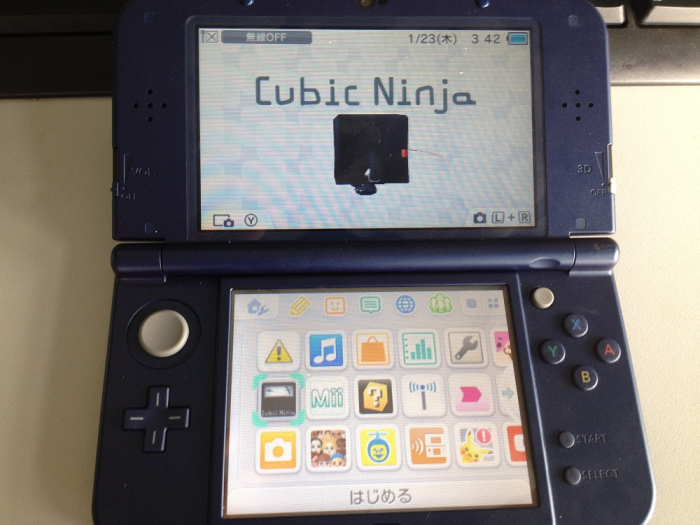
---Cubic Ninja genunie game card or SKY3DS(write/flash the game cubic ninja into root of SKY3DS micro sd card)
---Other cia games in .CIA format(copy the CIA games into root of 3ds console micro sd card)


Step 1: Extract the downloaded PASTA CFW V1.3(beta4), and open the folder "Pasta", you will see 2 folder: one for 3ds(folder "3ds") one for your PC system to use(folder"PastaCFW configurator").

Extract the downloaded FBI zip file and copy the FOLDER FBI into downloaded PASTA CFW V1.3 FOLDER 3ds, you will get 2 folders as below:


Insert your console micro sd/TF card into a USB Card Reader and connect this USB Card Reader to your PC. Copy all the files(boot.3dsx+BigBlueMenu.cia+FOLDER 3ds) to the root of your console micro sd card.


Open the folder "PastaCFW configurator", according to your PC system select one from the below 3 folders to run:

(We tested with PC windows system, so we opened the folder "Windowns" and click to run the file "PastaCFW Configurator.exe")
Select the micro sd card of your 3ds console, click to download:


When download completed, click "yes" to continue and close the window:


During that process it will automatically load 2 new files(firm.bin+system) into console micro sd card as below list :


Step 2: Write/Flash Cubic Ninja into Sky3ds micro sd card(you can view here: How to use flash game with Sky3ds?), insert Sky3ds into your 3ds console:


Step 3: Startup 3ds console and boot game Cubic Ninja, Press button L+R+X+Y at the same times in order to clean the previous QR CODE Memory. Choose and Download the QR Code for your console here: http://smealum.net/ninjhax/

Scran QR Code for your console:


Make sure you are in the PASTA CFW loader and FBI homebrew:

Step 4: Press the button A to read the Pasta CFW files, when back to menu, repeat starting cubic ninja > Edit > QR Code > Homebrew, then press button L+A at the same time to select the Pasta CFW loader, enter into the settings menu, select the option "backup sysNAND" in order to backup your console NAND:

Step 5: After you backed up the sysNAND, go to select the "Options" to continue:

Go to the option of "Enable FirmLaunch", change the "NO" to "Yes" and press button A to save:


Step 6: Go to the the setting menu, in the most left side, find the "Give me some pasta", select it in order back to the homebrew interface, select the "FBI", press button A to continue:


Step 7: Select the CIA File "BigBlueMenu.cia" to instal((if the BigBlueMenu.cia or Devmenu.cia installation failed, pls remember back to home menu and pull out console micro sd card and to go the the root of console Micro SD card to make an empty folder named by "dbs" and make a file named by "title.db" in your "Nintendo 3DS/id1/id2/dbs" folder. and retry the previous steps to instal BigBlueMenu.cia or Devmenu.cia), after the installation completed, press button "START" to exit:

Step 8: Homebrew menu will load in automatically, gift box will occur in the home menu:

Step 9: Select the cia game you want to play,

Step 10: Start the cia game, now you can enjoy playing cia games with the PASTA CFW System(firmware cheat function)!


2015-06-17

3DSTOWN.NET NEWS: Sky3DS updated template file [06/14/2015]

3DSTOWN.NET NEWS: Sky3DS updated template file [06/14/2015]

* Sky3DS updated template file [06/14/2015]
Change logs:
1.Fixed some bugs.
2.Added game:
1226 - Hello Kitty & Sanrio Friends 3D Racing EU
1232 - Tomodachi Life EU
1264 - Super Mario 3D Land (Europe) (En,Fr,De,Es,It,Nl,Pt,Ru) (Rev 2)
1251 - Code Name - S.T.E.A.M EU
 
http://www.3dstown.net/product.php?id_product=183
 

2015-06-12

Sky3ds Updated Template File(06/11/2015)

* Sky3DS updated template file [06/11/2015]
 
Change logs:
1.Fixed some bugs.
2.Added game:
Rhythm Tengoku - The Best+ JPN
 
In this newest Sky3ds template file, the game Rhythm Tengoku as been added and works well with Sky3ds game flashcard. You can view the update in Sky3ds official wesite here: http://sky3ds.com/download.html
 

Go to buy Sky3ds now!


2015-06-10

3DSTOWN.NET NEWS: Sky3ds updated template file(06/08/2015)


3DSTOWN.NET NEWS: Sky3ds updated template file(06/08/2015)


* Sky3DS updated template file [06/08/2015]
 http://filetrip.net/dl?ICBHDhNr5y [Mirror Download Link]
Change logs:
1.Fixed some bugs.
2.Added game:
1274 - Nintendogs and Cats - Toy Poodle & New Friends EU
Hatsune Miku Project Mirai DX JPN
STELLA GLOW JPN
Code Name - S.T.E.A.M
Hatsune Miku - Project Mirai DX (Kor)
Puzzle Dragon Mario US
 

>>>Go to buy Sky3ds


2015-06-07

3DSTOWN.NET NEWS: Sky3ds Updated Template File

3DSTOWN.NET NEWS: Sky3ds Updated Template File: 

---View and download the latest Sky3ds Template File on Sky3ds official website

* Sky3DS updated template file [06/02/2015]
Change logs:
1.Fixed some bugs.
2.Added game:
1267 - Fossil Fighters Frontier EU
1268 - Pilotwings Resort (EU) V01
1269 - Lord of Magna Maiden Heaven USA
1246 - Downtown Nekketsu Jidaigeki JPN


2015-06-05

How to choose a game flashcard for game console?

When I buy a new game console, I should be asking myself, what kind of game flashcard is good for my console and how to choose a good game flashcard for my game console?

The most important thing is you should know the game console type and console version:
---it is a new 3ds/3dsll or old 3ds/3dsll/3dsxl or 2ds? it is v4.1-4.5 or v4.1-9.2 or the latest v9.8.0-25?
---it is a 3ds games you want to play or nds games you want to play?

If you want to play 3ds games, you can choose 3ds game flashcards such as:
---Sky3ds(works on console version 9.8.0-25 with console type NEW3DS/3DSLL, OLD3DS/3DSLL/3DSXL, 2DS )
---Gateway 3DS(works on console version 4.1-9.2 with console type NEW3DS/3DSLL, OLD3DS/3DSLL/3DSXL, 2DS)
---R4i Gold 3DS Deluxe Edition(works on console version 4.1-4.5 with console type NEW3DS/3DSLL, OLD3DS/3DSLL/3DSXL, 2DS)
---MT-Card(works on console version 4.1-4.5 with console type NEW3DS/3DSLL, OLD3DS/3DSLL/3DSXL, 2DS)
And the most popular and hot selling is sky3ds and gateway 3ds.

If you want to play ds games, you can choose either the 3ds game flashcards or ds game flashcards such as:
---R4i Gold 3DS(works on console type: NEW3DS/3DSLL, OLD3DS/3DSLL/3DSXL, 2DS, DSI/DSIXL, NDS/NDSL)
---Ace 3DS Plus(works on console type: NEW3DS/3DSLL, OLD3DS/3DSLL/3DSXL, 2DS, DSI/DSIXL, NDS/NDSL)
---R4i-SDHC 3DS RTS(support 3DS V9.7.0-25 and NDSi V1.4.5), R4i-SDHC 3DS V5.0(support 3DS V9.5.0-23 and NDSi V1.4.5), R4i-SDHC 3DS(support 3DS V4.4.0-10 and NDSi V1.4.4), R4 i-SDHC V1.4.5(support NDSi V1.4.5), R4-SDHC(support NDSi V1.4.0)
---DSTWO(stoped production)
---M3i Zero / M3 REAL(works on console type: NEW3DS/3DSLL, OLD3DS/3DSLL/3DSXL, 2DS, DSI/DSIXL, NDS/NDSL)
---EZ Flash IV(works on console type: GBA/GBASP/GBM/ND)
---Acekard 2i/Acekard 2(works on console type: NEW3DS/3DSLL, OLD3DS/3DSLL/3DSXL, 2DS, DSI/DSIXL, NDS/NDSL)
---R4(0815): works on NDS/NDSL
---R4itt / R4itt 3DS RTS(works on console type: NEW3DS/3DSLL, OLD3DS/3DSLL/3DSXL, 2DS, DSI/DSIXL, NDS/NDSL)


What is the most popular 3ds game flashcard?

General speaking, there are 4 kinds of 3ds game flashcards in the market:
SKY3DS
Gateway 3DS
R4i Gold 3DS Deluxe Edition
MT-Card

And among these 4 types of 3ds game flashcards, the most popular and used will be Sky3ds and Gateway 3DS.

Sky3ds is the new and hot and popular game flashcard in recent years.
Main Features of Sky3ds:
1, sky3ds can be used for gaming console NEW3DS/3DSLL, OLD3DS/3DSLL/3DSXL, 2DS.
2, sky3ds can be used for the latest 3ds console version 9.8.0-25. 
3, one sky3ds game flashcard can be used to play several 3ds games, there is no quantity game limit.
4, sky3ds support eshop VS Network.
5, sky3ds support CFW.
6, sky3ds support micro sd card 2GB, 4GB, 8GB, 16GB, 32GB, 64GB, 128GB SDHC/SDXC Card.
7, sky3ds support region-free that means you can use sky3ds playing JP games on EUR 3ds console or on the contrary.

Gateway 3ds is the first 3ds game flashcard created in 2013 which earns gateway 3ds a hot reputation. 
Main Features of Gateway 3ds:
1, gateway 3ds can be used for gaming console NEW3DS/3DSLL, OLD3DS/3DSLL/3DSXL, 2DS.
2, gateway 3ds can be used for 3ds console version 4.1-9.2.
3, gateway 3ds support CFW emuNAND system which support playing 3ds games  in latest emuNAND 9.8 and support entering eshop to download  games and patch the games online.
4, gateway 3ds support games .cia/.dlc/eshop/.3ds/.nds.
5, gateway 3ds does not have the region lock, that means it support region-free you can play JP games on an EUR console or on the contrary.
6, gateway 3ds support game card dumper, that means it can suck out game rom out from the console original game flashcard.


2015-06-01

3DSTOWN.NET NEWS: SKY3DS works great on 3DS Console V9.8.0-25!

3DSTOWN.NET NEWS: SKY3DS works great on 3DS Console V9.8.0-25!

More Details review SKY3DS Blog: SKY3DS works great on 3DS Console Version 9.8.0-25!

http://www.3dstown.net/product.php?id_product=313


CIA Converter-CIAKonPack Support CIA gaming on New & Old 3DS Console Version 4.0-9.2 now!

CIA Converter-CIAKonPack News: the CIAKonPack Support CIA gaming on New & Old 3DS Console Version 4.0-9.2 now!
Old post CIAKonPack for Old 3DS Console V4.x:  CIA Converter-the CIAKonPack tool enables you playing CIA games without any problem!
---Just download the CIAKONPACK-OLD-NEW3DS for OLD3DS, extract the zip file, open the OLD3DS FOLDER

The newest CIAKONPACK-beta1.0 is much faster and stronger than ever, it compatible with both new & old 3ds console from version 4.0 to 9.2!

Requirement to use the newest CIAKONPACK:
---PC 64 bit system

How to use the CIAKONPACK for new 3ds console?
1, Download the latest CIA Converter tool: CIAKONPACK-OLD-NEW3DS

2, Extract the downloaded zip file:

Open the folder NEW3DS:


Copy the .3ds files which needs convertered to be .cia into the folder roms:

3, Select all the 3ds files in folder roms and drag them into “ncchinfo_gen-exheader.py”, waiting for seconds, it will automatically form the file “NCCHINFO.bin”, copy this “NCCHINFO.bin” into folder sdcard(pls note not your SD card):


4, Copy all the files in folder NINJHAX into root of your new 3ds console SD card(Decrypt9 CFW, if you already have, just continue), if you have no idea about the NINJHAX CFW, pls refer to NINJHAX OFFICIAL WEBISTE: http://smealum.net/ninjhax/:


5, Copy all the files in folder sdcard into root of your new 3ds console SD card, at this point, your 3ds console SD card directory will be like as below:

6, Boot your new 3ds console and run the NINJHAX CFW system(it requires genunie Cubic Ninja game flashcard or SKY3DS, if you have no idea pls refer to step three in old post about CFW (—Download Ninjhax for your 3ds console version and scan the QR Code in order to enter the CFW system PASTA CFW support CIA gaming with SKY3DS, no need gateway any more!), select Decrypt9 plugin, press console button A to select the first option:

when the process 100% complete, press button start back to the system menu:


7, Under your new 3ds console SD card, you can see the “.xorpad” file, copy the “.xorpad” into folder xorpad(in folder NEW3DS):


8, Double click “convert.py” can run the window, waiting for it complete, you will find all the cia files you need are under folder roms:


SKY3DS, Gateway 3DS Provided by 3DSTOWN.NET is on sale now!

http://www.3dstown.net/product.php?id_product=93